

Let’s be honest: nobody actually enjoys managing document records. You may find yourself hunting for a passport scan you uploaded two years ago. Or you might try to figure out which category a new certification falls under. Typically, the process involves a lot of clicking, searching, and second-guessing in Oracle HCM.
If you’ve ever wished you could just ask HCM to find a document record, I have some great news. This is instead of digging or scrolling through endless pages. The new Oracle HCM Document Records Management Assistant is here to change the game.
Think of it as your personal librarian who has a photographic memory of every document you’ve ever uploaded. This AI assistant is powered by advanced Large Language Models (LLM). It doesn’t just “search” for keywords. It actually understands the context of what you’re looking for.
This AI Agent is available with 26A upgrade of Oracle HCM.
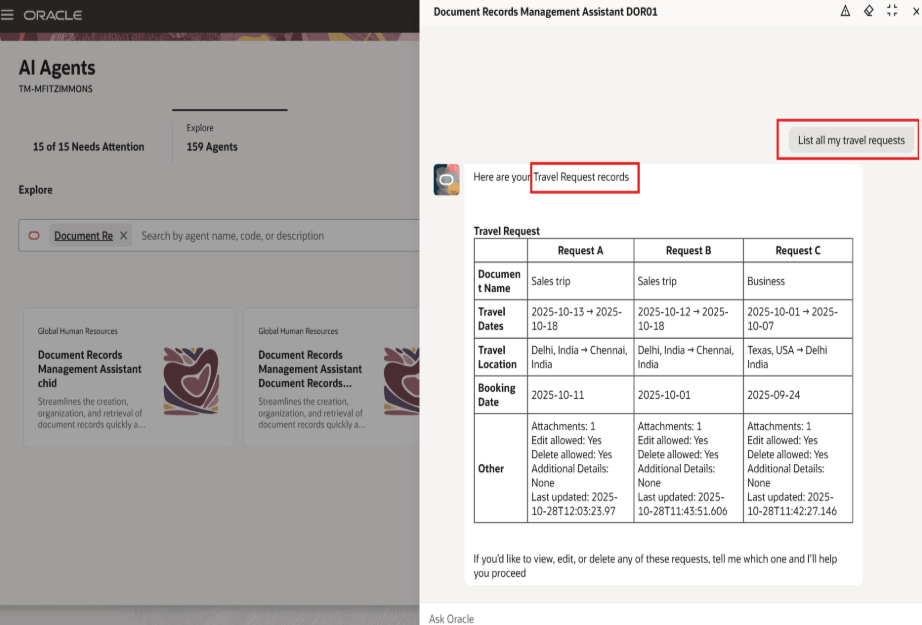
How it looks in action
The best part is how natural the interaction feels. You can just pop into the chat and type things like:
- “Find my latest passport”
- “Show me my pay slip from June 2025”
- “Create a travel request”
The assistant pulls the record, gives you a direct link, and you’re done in seconds.
Steps to set up this AI Agent :
- Go to Navigator > Tools > AI Agent Studio.
- Search the Document Record Management Agent template and click Copy Template.
- Add a suffix to the template. This will ensure that all the building blocks of the agent team are created and named as per your configuration nomenclature.
- Publish the agent.
- Create a guided journey and add an agent type task. For details, see Configure Agent Guided Journey.
- In Visual Builder Studio, browse to ESS Document Records Page and select edit. For details, see Extend Application Page with Agent Guided Journey.
- Add the agent code.
- Publish the redwood changes from page.

 Fusion People Hub
Share your Feedback